1. 机器配置
硬件 / 运行时
| 项 | 值 |
|---|---|
| GPU | RTX 4060 Ti 16GB |
| 系统 RAM | 32GB |
| ComfyUI | 0.31.0 · --lowvram · SageAttention |
| PyTorch | 2.6.0+cu124 |
| Attention | sage(已启用) |
生成设定
| 项 | 值 |
|---|---|
| DiT | H3 pruned INT8 convrot(~19.5GB) |
| Text Encoder | Qwen3-VL 32B NVFP4(~14.6GB,CPU) |
| Turbo LoRA | v4 step600 · bypass · strength 1.0 |
| Sampler | MiniMaxH3TurboSampler · simple · 8 steps |
| 帧 / FPS | 124 frames · 24fps ≈ 5.2s |
启动参数示例:
--lowvram --disable-mmap --disable-pinned-memory --cache-none --use-sage-attention
2. 时间拆解
来源:ComfyUI 日志 · Prompt executed in 00:46:03 · sampling 8/8 in 40:22
| 阶段 | 耗时 | 备注 |
|---|---|---|
| 模型加载 / 准备 | ~5–6 min | TE 完整上 CPU;DiT 部分上 GPU |
| 采样 step 1 | 7:08 | 最慢(冷启动 + 最大噪声) |
| 采样 step 2–8 | ~33 min | 后期约 4–5 min/step |
| 采样合计 | 40:22 | 259–303 s/it |
| 整 prompt | 46:03 | 含 decode / SaveVideo |
相对实时倍率(RTF):2763s ÷ 5.167s ≈ 535×
即:每生成 1 秒成片,大约要 9 分钟(在本次设定下)。
3. 本地瓶颈
主因:VRAM 流式卸载
DiT 实测:12.2GB 在 GPU、7.7GB offload。每一步前向都要经 PCIe 来回搬权重。SageAttention 只能加速注意力算子,救不了带宽。
模型体量
- H3 ≈ 视频 + 音频联合大 DiT
- TE 还有 32B VL
- 8GB 消费卡塞不下完整 H3 推理图;连 16GB 也只能「边算边卸」
优化收益边界
| 优化 | 作用 | 本次是否启用 |
|---|---|---|
| Turbo LoRA | 20→8 步(约 2.5×) | 是 |
| 0.2MP | 降低激活显存 | 是 · 608×352 |
| SageAttention | 降低 attention 成本 | 是 |
| --lowvram + TE@CPU | 避免 OOM | 是 |
三者已开,仍 ~5 min/step —— 说明瓶颈在权重流,不在算法步数。
OOM 踩坑(已规避)
Turbo LoRA 的 merge(low_vram=true)会在 INT8 权重上 dequant,峰值直接打满 16GB 并失败。
稳定路径:bypass LoRA + CLIP 放 CPU + Comfy --lowvram。
4. 操作教程
1. 模型:下载链接 → 存放路径
| # | 角色 | 文件名 | 约大小 | 目录 |
|---|---|---|---|---|
| 1 | DiT | minimax_h3_fl2va_pruned_int8_convrot.safetensors | ~19.5GB | models/diffusion_models/ |
| 2 | Text Encoder | qwen3vl_32b_minimax_h3_nvfp4_awq.safetensors | ~14.6GB | models/text_encoders/ |
| 3 | Video VAE | minimax_h3_video_vae_fp16.safetensors | ~4.9GB | models/vae/ |
| 4 | Audio VAE | minimax_h3_audio_vae_fp32.safetensors | ~0.6GB | models/vae/ |
| 5 | Turbo LoRA | minimax_h3_turbo_v4_step600_ema.safetensors | ~0.7GB | models/loras/ |
下载链接:
权重总页:Comfy-Org/MiniMax-H3 · LoRA:larryvrh/MiniMax-H3-Turbo-Lora
本机路径对照:
D:\dev\ComfyUI\models\diffusion_models\minimax_h3_fl2va_pruned_int8_convrot.safetensors
D:\dev\ComfyUI\models\text_encoders\qwen3vl_32b_minimax_h3_nvfp4_awq.safetensors
D:\dev\ComfyUI\models\vae\minimax_h3_video_vae_fp16.safetensors
D:\dev\ComfyUI\models\vae\minimax_h3_audio_vae_fp32.safetensors
D:\dev\ComfyUI\models\loras\minimax_h3_turbo_v4_step600_ema.safetensors
2. 节点与加速库
ComfyUI ≥ 0.30(本机 0.31)· 官方教程:docs.comfy.org … minimax-h3
cd D:\dev\ComfyUI\custom_nodes
git clone https://github.com/larryvrh/ComfyUI-MiniMax-H3-Turbo
SageAttention(Windows 示例 wheel):
sageattention-2.2.0+cu126torch2.6.0.post3 … whl
pip install triton-windows
pip install sageattention-....whl
3. 启动
cd D:\dev\ComfyUI
.\venv\Scripts\python.exe main.py --listen 127.0.0.1 --port 8188 --lowvram --disable-mmap --disable-pinned-memory --cache-none --use-sage-attention
或运行 start-comfy-ramfriendly.ps1 → http://127.0.0.1:8188
4. 出片
API(与本次一致)
cd D:\dev\code3\faceless-video-pipeline
python scripts\h3_smoke_t2v.py
设定:608×352 · 124 帧 · 8 steps · Turbo bypass · CLIP=cpu · simple scheduler
输出:D:\dev\ComfyUI\output\video\h3_smoke_turbo_608_*.mp4
GUI 要点
- UNET → MiniMaxH3TurboLoRA(strength 1.0,low_vram 关)→ SigmaShift → Guider
- Sampler 用 MiniMaxH3TurboSampler,Scheduler=simple / 8
- CLIP type=minimax,device=cpu
- 双 VAE → CreateVideo → SaveVideo
5. 关键踩坑
| 问题 | 处理 |
|---|---|
| INT8 + LoRA merge OOM | 用 bypass(low_vram=false) |
| 显存不够 | CLIP=cpu + --lowvram |
| 音频坏 | 必须用 TurboSampler |
| ~5 min/step | 16GB offload 正常现象 |
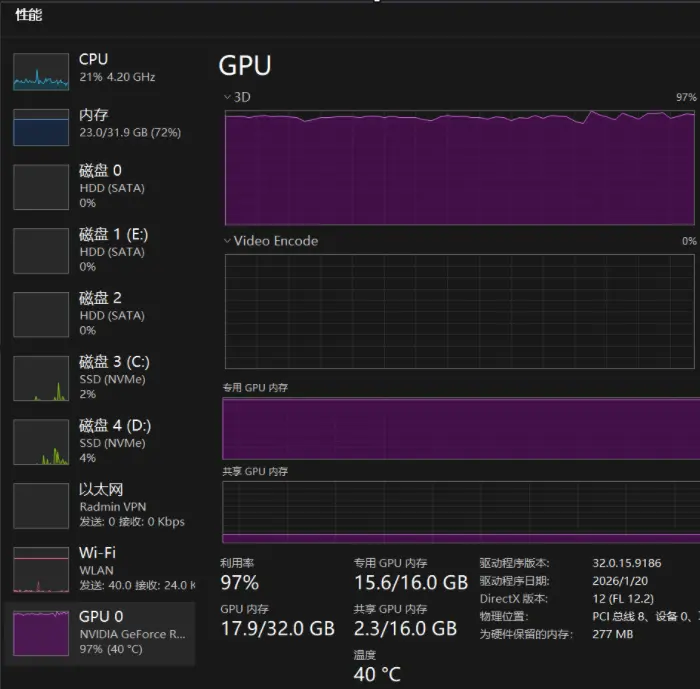
按层动态调度 优化
运行时(关键提速项)
启动参数(优化后):
模型 / 采样(对齐社区 480p 基线)
结果数据
A. 同档对比:~5s 片
成片:output/_h3_baseline_480p/h3_baseline_480p_20step.mp4
B. 加长:~15s 片(同优化栈)
成片:output/_h3_15s_480p/h3_15s_480p_20step.mp4
C. 粗算吞吐(优化后)
提速主因(按影响):去掉 --lowvram → DynamicVRAM 层卸 · 升到 cu130 + torch≥2.8 打开 kitchen INT8 CUDA · SageAttention 对齐新 torch。分辨率和步数其实都比旧 smoke 更重,但总时间仍从 46 分钟落到约 5 分钟。
COMMENTS
评论 0
安全验证